


Manage roles
Create roles with specific permissions for your staff
What is a role?
In a multi-user environment, roles allow you to restrict access to system features for each staff member. For example, a booking manager will only see the module BOOKING (Manage bookings, Weekly schedule, Manage recurrences) in the toolbar.

Access role management
Click the menu MEMBER, then select Manage roles.
Enter the name of the role you want to create. Then check the features allowed for this role using the form's checkboxes.
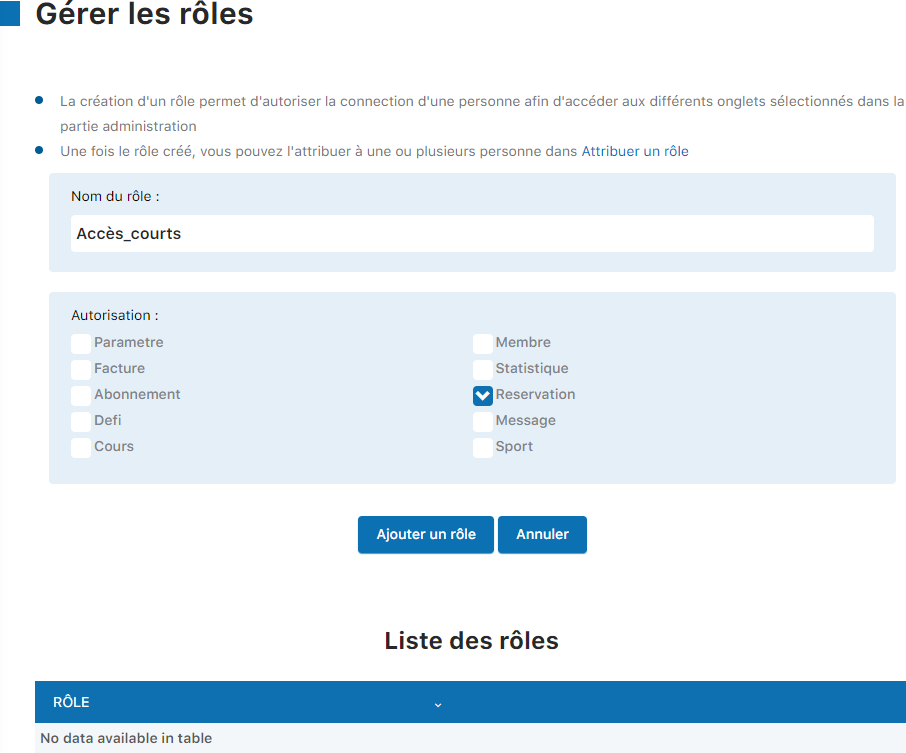
Click "Add a role"
Once the form is completed with the role name and desired permissions, click the Add a role button to save the new role.
Manage the list of roles
The created role will appear in the list at the bottom of the page. You can edit (pencil icon) or delete (trash icon) a role at any time.

💡 Tip: Create roles suited to your operational needs. For example, a "Billing manager" role could have access to the INVOICING module, while a "Coordinator" role could have more limited access.
Plugin.ch • Help Center • Video tutorial